World's #1 Downloader for Web Video & TV

Capture Any Web Video Automatically. Convert.

RipTiger is the easiest, most powerful way to capture and convert online video or audio automatically. Just start RipTiger, play your video or audio as usual and RipTiger saves it automatically. No additional click or configuration hassle. RipTiger does everything automatically in the background for you.


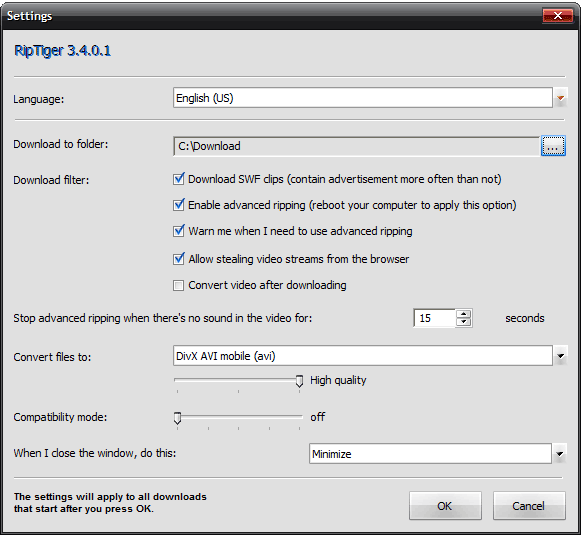
Starting RipTiger - Settings
Please configure RipTiger according to your best needs before starting to dowlnoad.


Click on the "Settings" button on the program panel to make the needed adjustments.

    1) “Download to folder:”. Specify the folder where you want RipTiger to save your downloaded videos.

    2) “Download filter:”. Specify whether you want RipTiger to capture SWF files. These file types mostly contain advertisements but sometimes may be valuable to you.

    3) "Convert files to:”. Specify the output format fot the RipTiger built in video converter. Chose from AVI, iPod and Windows Media formats with various quality settings.

    4) "Compatibility Mode:”. Move the slider to the right if you are experiencing troubles with your downloads. Usually applies to the long videos.


See also:


RipTiger will only download videos that are accessible free of charge and in no way protected from being publicly viewed. This restriction, inter alia, applies to password and DRM protected videos, of which neither can be downloaded with RipTiger in pursuance of relevant provisions of the copyright law.
RipTiger RipTiger RipTiger